How Image Size Affects Page Speed (LCP Explained Simply)
Your site feels slow and you're not sure why. One of the most common suspects is a photo uploaded straight from a phone or camera: thousands of pixels wide and several megabytes, shown in a space a few hundred pixels across.
Google measures how quickly the main content of a page appears with a metric called Largest Contentful Paint (LCP). This guide explains LCP in plain terms, shows where images fit in, and shares what happened when we resized and compressed one large photo and measured LCP before and after.
What LCP measures
In Google's words, "LCP reports the render time of the largest image, text block, or video visible in the viewport, relative to when the user first navigated to the page."
Put simply: when someone opens your page, LCP is the moment the biggest thing they can see without scrolling finishes appearing. On many pages that's a large photo at the top. On others it's a headline or a block of text.
Images count. web.dev lists <img> elements among the element types LCP looks at, along with images inside SVG, video poster images, CSS background images and blocks of text.
What counts as a good LCP
Google's guidance on web.dev is that "sites should strive to have Largest Contentful Paint of 2.5 seconds or less." It also sets a "poor" line: in its article on how the thresholds were chosen, web.dev concludes that "4 seconds is a reasonable 'poor' threshold."
| LCP | Rating |
|---|---|
| 2.5 seconds or less | Good |
| Over 2.5 s, up to 4 s | Needs improvement |
| Over 4 seconds | Poor |
One detail matters: these targets apply to real visitors. web.dev says "a good threshold to measure is the 75th percentile of page loads", split by mobile and desktop. So one fast test on your own computer doesn't prove the page is fast for everyone.
Where image size comes in
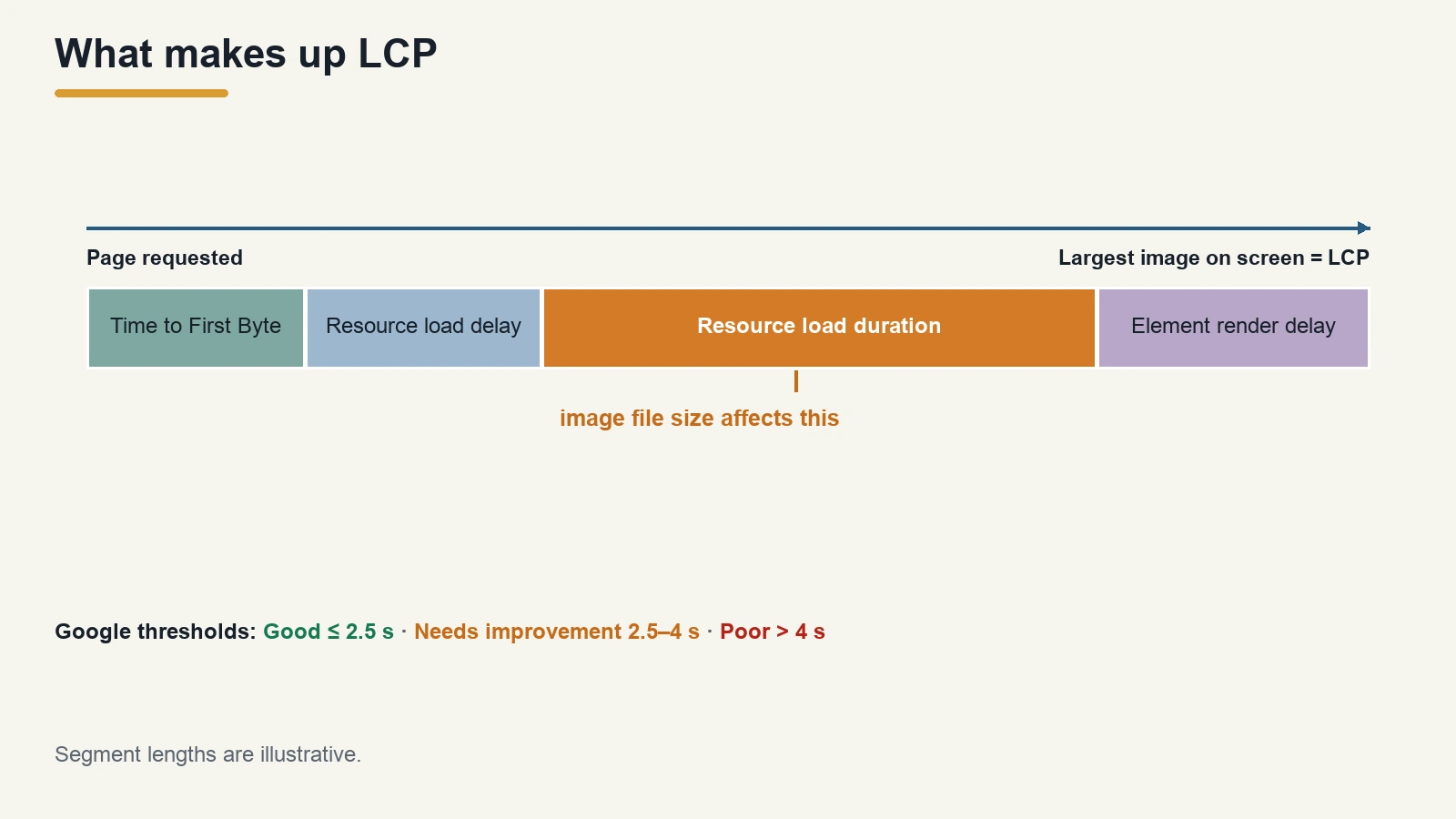
web.dev breaks LCP into four parts that add up to the total:
- Time to First Byte (TTFB): how long until the browser receives the first byte of the page.
- Resource load delay: the wait between that first byte and the browser starting to download the LCP image.
- Resource load duration: how long the image itself takes to download.
- Element render delay: the time between the image finishing and it actually appearing on screen.
The size of the image file mostly affects part 3. A bigger file takes longer to download, especially on a slow mobile connection. web.dev's first suggestion for that part is to "Reduce the size of the resource", and its guides for doing that include serving the right image size and compressing images.
It's worth knowing what web.dev also says: "the load duration portion of LCP tends not to be a significant bottleneck for most sites." If your images are already a sensible size, the delay may be somewhere else, like a slow server or scripts that hold up the page. But if you're uploading multi-megabyte photos, the image is an obvious place to start.
Our test: one big photo, before and after
To see how much difference image size makes, we took a single photo and measured LCP four ways.
The test conditions
- Image: a phone photo of a motorcycle tire, 4284 × 5712 pixels as displayed, saved as a 4.61 MB JPEG.
- Page: a test page with one line of text and the photo shown 800 pixels wide, served from a local web server.
- Browser: Chrome, window 1280 × 900, cache turned off for every run.
- Network: we limited the connection in Chrome to two speeds: a slow one (1.6 Mbps download, 150 ms latency) and a faster one (10 Mbps, 40 ms).
- Measurement: the browser's own LCP reading, three runs for each version. We report the middle value. In every run, the photo was the LCP element.
The four versions
All processing was done with ForgePX's free tools in the browser:
- A. Original: 4284 × 5712, 4.61 MB.
- B. Compressed only: the image compressor at quality 80, JPEG output. Same pixel size, 2.37 MB.
- C. Resized only: the image resizer set to Fixed Width 1600 px, JPEG output. 1600 × 2133, 644.1 KB.
- D. Resized, then compressed: version C through the compressor at quality 80. 1600 × 2133, 357.0 KB.
Why 1600 pixels? The photo is shown 800 pixels wide on the page. High-density screens use more than one device pixel for each CSS pixel, so we gave the image twice the display width to keep it sharp on those screens. Choosing widths for different screens is a topic of its own; here we just wanted one sensible size to compare.
The results
| Version | File size | LCP, slow connection | LCP, faster connection |
|---|---|---|---|
| A. Original | 4.61 MB | 24.6 s | 4.07 s |
| B. Compressed only | 2.37 MB | 12.8 s | 2.14 s |
| C. Resized only | 644.1 KB | 3.64 s | 0.65 s |
| D. Resized + compressed | 357.0 KB | 2.17 s | 0.41 s |
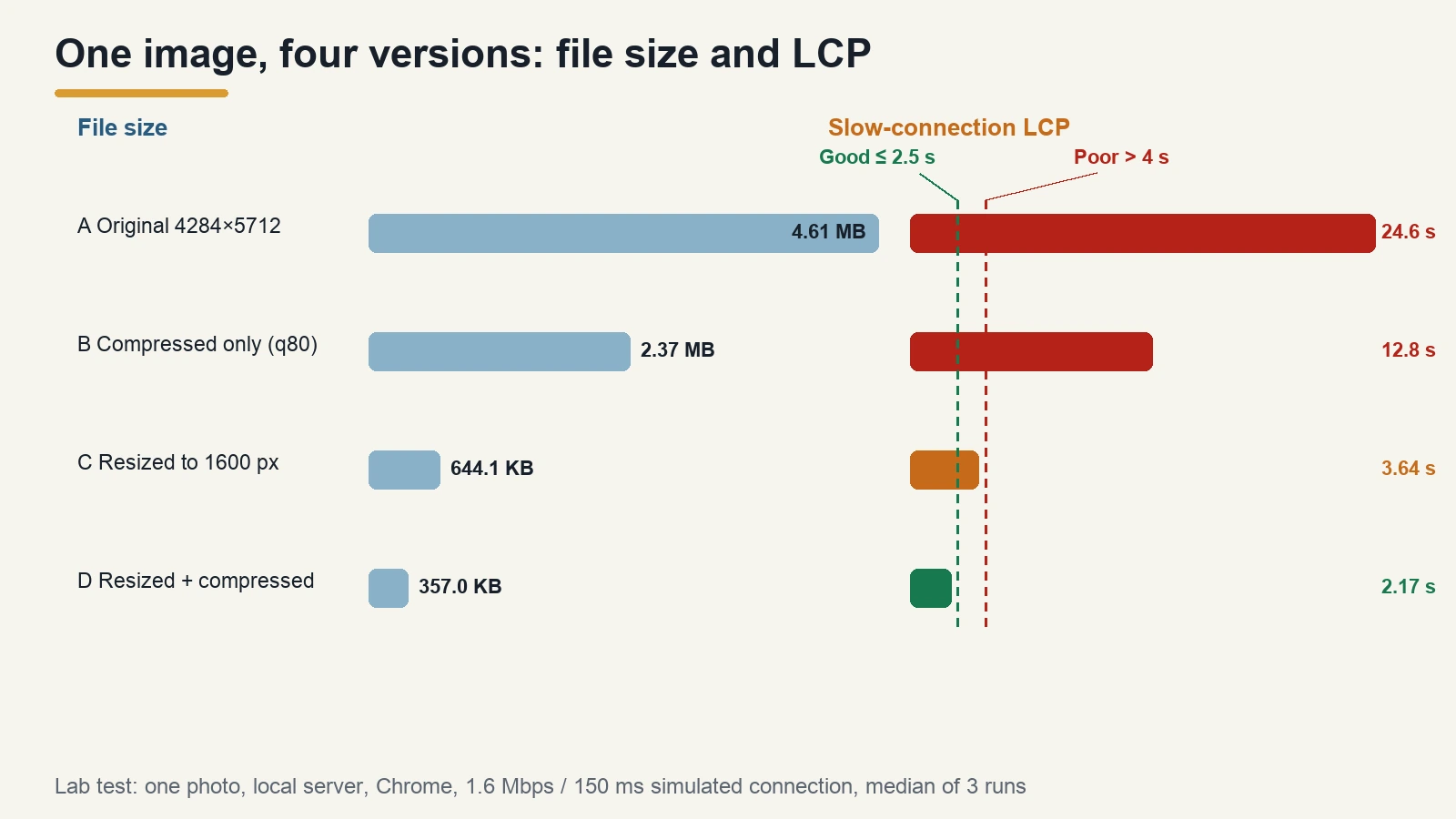
On the slow connection, the original photo took almost 25 seconds to appear, far beyond the 4-second "poor" line. Compressing it without changing its size roughly halved the file and the LCP, but 12.8 seconds is still poor. Resizing made the biggest single difference, because the file went from about 24 million pixels to about 3.4 million. Resizing and then compressing brought LCP to 2.17 seconds, under the 2.5-second target, from a file 92% smaller than the original.
On the faster connection, the original was just over 4 seconds and the other three versions were all under 2.5 seconds.
What this test does and doesn't show
This was a lab test: one image, one page, a local server and a simulated connection. Real pages have other files competing for bandwidth, servers that take time to respond, and visitors on all kinds of networks. Your numbers will be different. What the test does show is the order of the effect: for a photo straight off a phone, resizing to the size you actually display matters more than the compression setting, and doing both gives the smallest file.
How big should website images be?
There's no single right number, but the test suggests a simple routine:
- Find the display width. Check how wide the image appears in your page layout, in CSS pixels. Your browser's developer tools show it when you inspect the image.
- Resize to no more than about twice that width (what we used in the test, for high-density screens), using a fixed-width resize so the image keeps its shape. Our guide to resizing without stretching explains the options.
- Compress the resized file. Quality 80 in our test cut the resized JPEG by 45% (644.1 KB to 357.0 KB).
- Consider a modern format. web.dev lists "Use modern image formats" among its ways to reduce the LCP resource. Our comparison of AVIF vs WebP and our image formats guide cover when each one fits.
- Check the result by opening the page and looking at the image at full size before you publish.
If you have a whole folder of photos, our batch compression guide shows how to process them together.
FAQ
What is Largest Contentful Paint?
LCP is a Google metric for how quickly the main content of a page appears. web.dev defines it as the render time of the largest image, text block or video visible in the viewport, measured from when the user started loading the page.
What is a good LCP time?
2.5 seconds or less, measured at the 75th percentile of real page loads. Over 4 seconds is rated poor.
Do large images slow down a website?
They can. A large image file takes longer to download, which adds to LCP when that image is the largest thing on screen. In our test, a 4.61 MB phone photo had an LCP of 24.6 seconds on a slow simulated connection; resized and compressed to 357.0 KB, it was 2.17 seconds.
Should I resize or compress images first?
Resize first, then compress. Resizing removes pixels you don't need; compression then shrinks the remaining file. In our test, resizing alone cut LCP more than compression alone, and doing both gave the best result.
Will compressing images fix my LCP?
Not always. web.dev notes that image download time is often not the main bottleneck. If your images are already a sensible size, look at server response time and anything that delays the page from showing the image.
Sources
Checked on 2 November 2026.
- web.dev, Largest Contentful Paint (LCP) (definition, 2.5 s, 75th percentile, element types)
- web.dev, Defining the Core Web Vitals metrics thresholds (LCP good ≤2.5 s, poor >4 s)
- web.dev, Optimize Largest Contentful Paint (four subparts, reduce resource size, load duration warning)
- Image processing and LCP measurements: our own test (ForgePX tools, Chrome 156, 2 November 2026)